Pages

Monday, 3 September 2012

Dell Latitude Dell E6400/6500Dell E6400/6500 14.1in Business Notebook


Dell's Latitude range is a regular feature of any commute. Get on any morning commuter train and your bound to see Latitudes of all shapes, sizes and ages dealing with spreadsheets, email, documents and the like and probably the most common would be the 14.1in Latitude D630, or its predecessor the D620, both of which received a Recommended Award when we reviewed them. Whereas in the consumer space this form factor is largely being edged out, in the business sector it remains a particularly appealing compromise between performance, portability and usability. No surprise, then, to see Dell using its new 14.1in Latitude E6400 as the poster child of the new Latitude range.

Dell E6400/6500
In the past we've always praised ThinkPad's, like the wonderful X300, for their timeless design and Dell has clearly tried to achieve a similar effect with the new Latitudes. It doesn't quite manage this but unlike the D630, which was more of a refresh than anything else, the E6400 ispart of a complete redesign of the Latitude range and though naturally it retains the professional appearance of previous Latitude's, it brings with it a level of sleekness and style that's previously been missing.
Dell E6400/6500

This is achieved through a combination of some strong angular lines and a classy magnesium alloy construction that's most evident in the brushed metal lid. It's not complicated but it does work and it helps that the E6400 is fairly light and slim for its size. At its thickest it measures 31mm and with the standard six-cell battery it weighs 2.3kg, making for a fairly portable weight that's 100g or so lighter than the D630 it's replacing. Plus, for the adventurous, Dell is even selling coloured lids for Latitude's too, though we can't see many companies being interested in this!

Dell E6400/6500
So far, so good, but the magnesium alloy construction isn't just about making the E6400 look good, it's primarily about strength and here Dell scores another win. Almost every element of the E6400 looks and feels very sturdy and particular praise must be directed toward the hinge. It's very strong and stiff, so bumpy journeys shouldn't be a problem, while the machine is evenly balanced so the front doesn't lift up when opening the lid and/or adjusting the screen angle - something that's a regular annoyance on consumer laptops. There's also a reassuringly secure lid clasp on the front, so you needn't worry about your laptop popping open when inside a bag.

This sense of quality is continued in the keyboard. As ever with Dell, the basic layout of the keyboard is excellent. There's a large and very usable Shift key on the right, below which sits offset cursor keys, while the Insert, Delete, Home, End, Page Up and Page Down keys are all grouped in a grid in the top right. Everything is more or less exactly where you'd expect and want it to be, the only exception being the omission of the 'Menu' key normally found on the bottom row. It's hardly a deal breaker, though, especially if it allows everything else to be just right.


Dell E6400/6500
This layout prowess is coupled with, without doubt, the best feeling Dell keyboard we've ever come across. Keys are tactile, well proportioned, firm and responsive and you have to press extremely hard to garner even a tiny amount of flex. It still lacks the supreme quality found in ThinkPad keyboards, but other than that it's hard to find any fault whatsoever.

Wednesday, 15 August 2012

Seeking out for a New Laptop Battery power


Listed here is a quick and easy option to finding the most effective substitute laptop battery on your laptop or computer. In case you are being a lot of people out there and your mobile computer power supply just isn't what it really was once, then you definitely could possibly be inside challenging circumstances when attempting to locate a an alternative one. There are various components that have to become accounted for when selecting a whole new battery pack on your laptop or computer such as the measurement, the particular voltage specifications of one's personal computer, the standing of your battery, along with and you'll discover one particular. Get the electric battery you will need for no more with laptops for less coupon codes.

To start with, you should locate a alternative notebook battery that will actually fit as part of your personal computer. It wouldn't end up being excellent if you get home with your fresh battery to discover that it doesn't actually physically complement with your laptop. To make this happen, everything that is frequently required is made for one to be aware of the personal computers model and make quantity or even the part amount on your own outdated battery. By doing this, it is possible to match up battery for the battery inner compartment.

After that you have to be sure that the alternative battery that you obtain gets the same voltage as the laptop or computer. It is a quite essential action then one that can be effortlessly ignored. If you are buying your substitution notebook battery through the use of laptops for less coupon then you definitely should be able to match up a battery in your computer with no difficulty. Nearly all computers enable some a disparity among voltages, with regards to just one volt, but it is best to find a perfect match up.

Now that you've got discovered the particular voltage, you should decide on the actual rating with the battery pack you wish. This can be based on looking at the actual ranking for the electric battery that may be in a choice of watt-hours (WHr) or maybe milliamp-hours (MAh). This rating simply notifys you how much charge an electric battery can give you as well as for how much time. And so the higher the particular rating, the greater strength battery power offers which often signifies it will be more costly.

After you have discovered the exact electric battery that you want, you need to get a single. There are many niche stores that handle laptop computer battery packs on the web just like laptops for fewer discounts code you could acquireelectric batteries. These are fantastic as they are able give you a great deal of expert consultancy and are also extremely cut-throat in relation to price tag. They even can ship out there many things on the day you set your buy.

Saturday, 11 August 2012

Your laptop battery and your health


When you are using the laptop, you should take care of many things related to the battery in order that the battery as well as the user that is you remains safe from any kind of danger.

First, never keep the batteries adjacent to the fire or any place of too much heat since extreme heat can result in the explosion of the batteries.
 

Secondly, any people should not carry the charging devices within the pocket as well as in their purse along with the metal objects, coins, hairpins and paper clips because short circuit may happen which in turn will cause extreme heat.

Third common risk, which you should avoid, is mixing the old batteries with the new ones or mixing dissimilar kinds of charging devices together because such things may cause leakage which is injurious to your health as well as your belongings.
 

The fourth risk occurs when people try to disassemble the various battery parts of their notebook on their own without calling the expert, in order to rectify any kind of problems in the batteries. By no means, you should do this if you don’t have the particular knowledge, because this may cause heavy explosion, which will harm not only you but also your property and other people in the house. There were such incidents in the past where the users have died due to the explosion when trying to disassemble the battery parts.
 

In addition to these, if the users overcharge the batteries or there is anelectrical error, say a short circuit, the chemical elements present within the cells of the battery may turn into an explosive and can catch fire at any moment.

Saturday, 4 August 2012

Top quality dell inspiron 9300 laptop battery


Top quality dell inspiron 9300 laptop battery

Inspiron9300 Battery power gives you the ability to use your computer around the house, in the office and when you travel. This Dell li-ion battery is designed exclusively for use with the inspiron 6000,inspiron 9300,inspiron 9400 Notebooks. It is also backward compatible with inspiron 9200,inspiron e1705 Notebooks.

ThisDell inspiron 9300 laptop battery features li-ion chemistry within its cells. The lithium battery technology provides longer run times with less weight.This inspiron 9300 laptop battery replacement is 100% compatible with the original Dell laptop battery specifications and is individually tested and backed by a 1 year warranty. This battery is rated at 11.1 volts and 6600mAh capacity. You can expect 3-4 hours of run time with this battery.It also fits Dell inspiron 9400 laptop computer.


Chemistry: Lithium-Ion
Voltage: 11.1V
Capacity: 6600mAh(73WH)
Size: 209.40 x 71.80 x 19.80mm
Weight: 578.33g

Tuesday, 17 July 2012

ASUS X54L-SX013V Laptop Review


Features

2nd for today is an Asus X54L series laptop! This is a slightly watered down version of the K53. With less memory and hard drive, this offers an even cheaper everyday laptop with greater versatility

Priced at $649, some might question if the difference in memory and drive space is actually worth the $50 difference, or is there something secret about this laptop were about to find out? Before we begin, let’s take a look at it guts:

Brand New Laptop 


Model: X54L-SX013V
OS: Windows 7 Home Premium
CPU: Intel® Core™ i3-2310M (2.1GHz)
Memory: 2GB DDR3 (1333MHz)
Hard Drive(s): 500GB 5400RPM
Optical Drive(s): Super Multi DVD R/W
Networking: Gigabit Ethernet
Graphics: Intel HD Graphics 3000
Display: 15.6” HD LED Backlight (1366x768 Resolutions)
Audio: Altec Lansing Speakers
Coms: 802.11b/g/n
Inputs: 1x USB2.0, 1x USB3.0,  1x Microphone, SD/MMC Card Reader
Outputs: 1x Headphone Out, 1x VGA
Battery: 4 Cell5200mAH 37Whrs

Pretty average specs.
The factory restore feature on this unit is exactly identical to the previous ASUS review. The lack of extra memory however did cause it to take a little bit longer to complete.
Laptop Keyboard 

The track pad itself has a feature called “Palm ProofTechnology” which prevents mouse movement and accidental clicks with your palm while typing over keys that sit above the pad. And guess what? It works amazingly! I have always had the problem when typing my palms would accidently brush over the track pad and I’d inadvertently clicked away or cancelled a whole heap of work, well this laptop will help prevent errors like this!

Design

Laptop LCD
Unpacking the box was like deja-vu. It was only a few hours beforehand did I unpack a K53, so unpacking the X54 seemed like I was repeating the process. Exactly the same packaging for both units. However the manuals for this unit, instead of having its own pocket within the laptops cover, was placed on top of the actual unit and covered up.


The unit itself looks a bit blander. The lid and keyboardsurroundings are simple charcoal black matte plastic, and as simple as it is, I fell in love with it. It feels so much better than the other shiny laptops, and leaves absolutely no marks or prints anywhere on the unit! On the left side of the unit you have the exhaust, a USB 2.0 port, a USB 3.0 port, Ethernet and VGA output. And that’s all you get. Total of two USB ports; however one of them is a 3.0 port. Not exactly sure why they put USB3.0 on a lower end machine and left it out on the higher end. Marketing strategy maybe? On the front you’ll find the audio input and output, which I think is a wise place to put such ports and of course the memory card reader, which is placed in a slighter better position than the awkward K53.

The keyboard is probably NOT one of the most comfortablekeyboards I have used. Although it does stay as cool and quiet as the K53, the keys are slightly raised and don’t have its own mould for it to sit in. This can be a bit more annoying, as I found my fingers clipping the edges of neighbouring keys. If you have fingers like mini breadsticks, then you’d probably get away with it, but any chunk on those fingers and you could find yourself backspacing a number of times to fix your typos. It also encourages any food bits that might fall on it to really get in there and become a pain to get out, so if you tend to eat a bit of food in front of your laptop, might want to be careful in front of this unit as you may collect enough food in their to feed a family of laptop key animals.


The notebook is your standard 15.6” Screen sized laptop, weighing in at 2.6Kgs it’s also not the lightest. The power adapter on the laptop is probably one of the most annoying things I have come across in a laptop. It is positioned on the left hand side of the unit, and it has a 90 degree plug. Also, the cable sits in front of the exhaust, with all hot air coming out of the unit, blowing right onto the power cable. Not exactly the wisest thing to do. I’m sure not all users would be comfortable with their laptops power cable heating up constantly. Unless you plug your cable in on an awkward angle, this could potentially be hazardous in the future. Felt like deja-vu? That’s because you may have read the exact paragraph in my previous review. Same problem on two models. How many more will I come across?

As I went to plug it in, I noticed the power end of the cable, to be ridiculously short and I had the AC unit on the floor because the cables length did not reach the top of the table. This could be a bit frustrating for those who plug it in and walk away to a lengthy distance to use their laptops.
Performance 
Overall, I actually love the look and feel of this laptop, sure, the keys are a bit annoying, but it just feels so fricken awesome! It also feels slightly smaller and more compact than the K53 which makes it a better option for using it on the move.

Performance

Featuring the same Core i3 processor as the K53 I suspect it to perform similar. It does however have 2GB less memory to work with, which may be problematic for memory heavy software.
Booting the unit came in at 80s, which is a significant increase from a machine using the exact same processor. I think the lack of extra memory can be hold accountable for the difference.
The display of the unit is much better than the K53. It is much more comfortable to view and images like photos from a DSLR look very nice, HD Video clips also produced a good contrast between colours. Blacks and Whites were comfortable and not blotchy.

Sound on the X54L is relatively good. Although you’re not going to get boom box equivalent sound coming out of the speakers, it still manages to provide comfortable listening levels

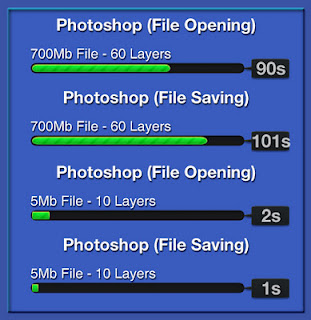
We installed Photoshop CS5 64bit to test out how simple editing will run. Installation took only 8 minutes which is fairly good result, yet slightly longer than the K53. Launching Photoshop was also very responsive, coming in around the 20sec mark. Again, this is where the extra memory would help. It took me just a few seconds to open up 5-10mb files which are promising as these are the average sizes most users will be working with; however opening a 700mb file took roughly 90s. Slightly more than what I was hoping for. After half an hour or so working with the 700mb file, things did get quite sluggish and unresponsive. It was taking longer and longer to perform simple tasks, and this laptop, just wasn’t up to it.


Performance 
Performance 
Having the same CPU as the K53, the X54L performed identically when it comes to simple software like Office, Excel and Outlook. Though it’s an i3 processor, it’s more than capable of handling majority of everyday user’s needs. I am becoming fonder of this i3 processor for the everyday user, as it costs less, produces less heat and consumes less power. It seems like an ideal specification to choose if you’re after all the above.

Our Cinebench software gave us the following test results:

CPU: 2.01pts
OpenGL: 7.71ps

The CPU in this unit performed .02pts better than the K53. Being such a small amount, overall, it will perform no different from each other. The on board Intel HD Graphics 3000 processor however demonstrated why this is not a very good graphical machine, giving half the frame rate of the K53.

Our PCMark07 benchmark gave a result of 1862 PCMarks.

That’s roughly 300 marks higher than the K53. Although it struggled with any of the gaming side of things averaging 11.09FPS, it absolutely creamed the Video Playback and transcoding sections almost doubling the results of the K53. This is a remarkable outcome for a unit that has less memory and graphical power. It seems as though the Built-In Visuals with the Intel HD Graphics 3000 processor helps in doing simple graphical tasks, but struggles on the heavy end of things.

As this is not a gaming unit, and also being able to roughly predict the score I decided to skip over the 3DMark tests.

Temperatures were interesting with this unit. The hard drive itself barely flinched between idling and being under full load. At no point did the drive reach above 36 degrees. This is a fantastic outcome for such a unit. The unit itself as a whole, and not just the palm areas also remained unbelievably cool, even when the CPU was peaking at 70 degrees. I’m not sure where all that heat is going, but it’s good to know it’s actually going somewhere and not burning up the desk or my legs. I am somewhat bedazzled as to where this heat is actually going.


Conclusion

Brand New laptop 

This unit has a similar target market of those for the K53. Like its successor, it is not aimed at heavy end users that require more power for multimedia applications and gaming. However, for the price this is an unbelievable machine. It has done more than just impressed me but given me hope for the lower end user market. It is good to see manufacturers can still produce machines that don’t have all the beef and oomph yet can still put out a wow factor.

Wednesday, 11 July 2012

Alaziz Online

Laptop Battery Care


Batteries are laptops'Achilles' heels. Many mobile users have been let down by their battery meters, too, which can misjudge or misrepresent how much charge is actually left in your battery. The shortcomings of the built-in Windows meter lead to free tools like BatteryCare. It's a simple utility that displays your laptop battery's status and capacity and the time remaining in its discharge cycle. It monitors and displays CPU and HDD temperatures, too.


Replacment Battery 
BatteryCare has a small but attractive interface that offers a lot more information than the built-in Windows tool, or many other battery meters we've seen, for that matter, with tabs for Basic and Detailed Information; the latter includes entries for battery model, designed capacity, wear level, and more. A system tray icon lets users display and hide the interface and access not only the program's options but also Power Settings and Power Plans. Hovering the cursor over the icon called up a semitransparent window showing battery status and charge but also the temperature of our CPU and primary hard disk drive. BatteryCare has a lot of settings for a simple tool, especially in the Notifications section, which includes not only full, low, and critical battery level warnings but also a configurable remaining time warning and a unique option to configure a warning to replace the battery after a certain number of discharge cycles, which can head off trouble before it catches up to you "in the field." The Power Plans section included selections for running on batteries and plugged in to AC power, as well as an automatic option. The Advanced section showed usage statistics as well as an option of particular interest to Vista users: the ability to run at startup in Administrator mode, which enables temperature monitoring and service pausing even when the bothersome User Account Control is active.
Battery For laptop 


If you rely on your laptop's batteries, we highly recommend a good battery meter like BatteryCare. Even if your laptop stays tethered to a wall wart, though, it can help you ensure that your battery is ready to go, when and if you need it.

6 Cell Laptop Battery